Getting Started
Suprema Device Manager is a mobile application that uses BLE communication to configure Suprema’s XPass D2, XPass 2, BioEntry W3, and XPass Q2 devices.

Administrators can connect to the server from a PC or set the device's network, server, RS-485 communication, card format, keypad settings, PIN, LED, and buzzer from a mobile device without physically disconnecting it, and can also use functions such as device restart, firmware upgrade, and device setting initialization.
For XPass D2, values set once can be saved as a template for quick and easy application to multiple devices.
Using Suprema Device Manager allows on-site modification of the settings of XPass D2 configured with third-party controllers.
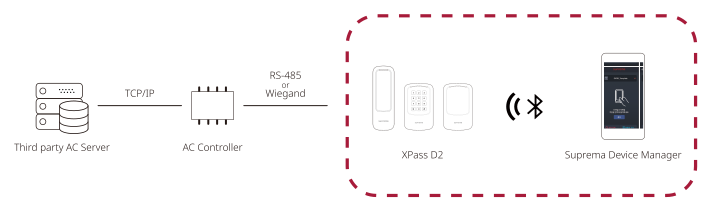
Minimum requirements
Mobile Device
Check if the mobile device supports BLE communication.
-
Android 5.0 Lollipop or later
-
iOS 9.0 or later
Device and Firmware
Check compatible devices and firmware versions.
-
XPass D2 firmware version 1.1.0 or later
-
-
XP2-MDPB, XP2-GDPB, XP2-GKDPB: firmware version 1.0.0 or later
-
XP2-MAPB: firmware version 1.4.1 or later
-
XP2-MAPB-H: firmware version 1.4.3 or later
-
-
BioEntry W3 firmware version 1.0.1 or later
-
XPass Q2 firmware version 1.0.0 or later
-
Compatible devices and firmware are subject to change.
-
If the device firmware version is lower than the versions listed above, upgrade the device firmware in BioStar X. When using the device as a slave, the connected master's firmware must also be the latest version compatible with BioStar 2 2.7.0 or later.
-
For more details on upgrading device firmware, please refer to IP Device (Upgrade Device Firmware), XPass D2 (Upgrade Device Firmware), or the BioStar X Administrator Guide.