Installation
Provides the complete installation procedures and connection examples required for the device.
Product Fixation
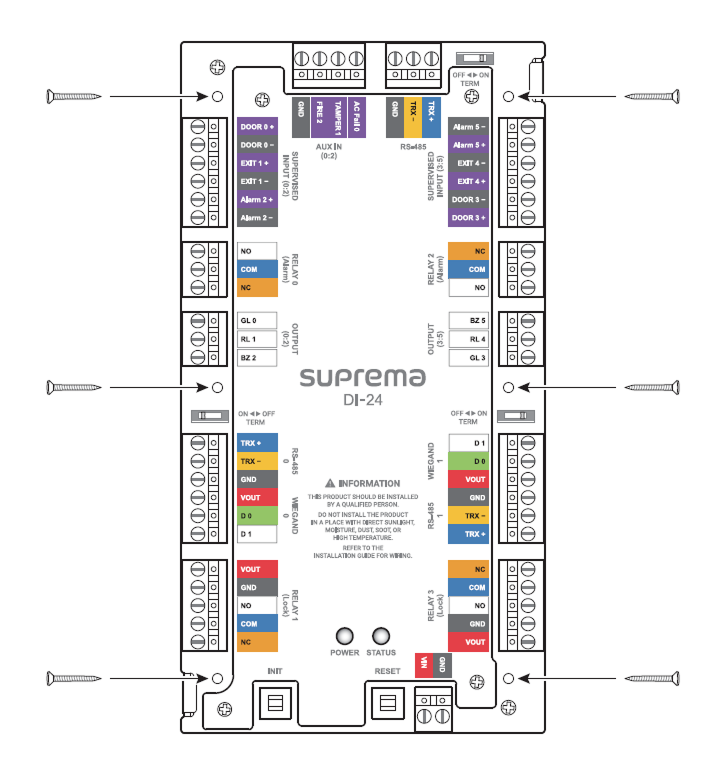
Secure the product tightly with a fixing screw at the location to be mounted.
Power supply connection
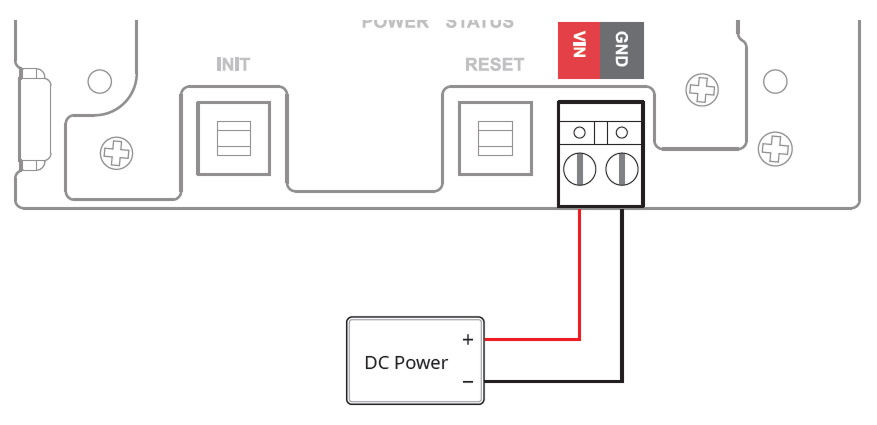
- Make sure to use separate power for the reader and products.
-
Use the IEC/EN 62368-1 approved power adapter that supports higher power consumption than the product. If you wish to connect and use another device to the power supply adapter, you should use an adapter with a current capacity which is the same or larger than the total power consumption required for the terminal and another device.
- Refer to the Power in the product specifications for maximum current consumption specifications.
- DO NOT extend the length of power cable when using the power adapter.
It is recommended to connect and use an Uninterruptible Power Supply (UPS) to prevent power failure.
Power-specific reader and lock power specifications
| Power | Reader (maximum current, number of devices) | Lock (maximum current, number of devices) |
|---|---|---|
| DC 12V | 600mA (300mA x 2) | 1.2A (600mA x 2) |
| DC 24V | 300mA (150mA x 2) | 600mA (300mA x 2) |
Maximum extension length by cable specification
The distance that can be connected may vary depending on the cable specifications and installation environment used for power connection. If cable connections are made improperly it may cause the device to malfunction. This product supports both DC 12V and DC 24V power supplies, so check the maximum extension length according to each cable specification and connect the power correctly.
| Cable Specification | DC 12V | DC 24V | ||
|---|---|---|---|---|
| Reader (300mA) | Lock (600mA) | Reader (150mA) | Lock (300mA) | |
| 14 AWG | 380 m | 190 m | 1540 m | 770 m |
| 16 AWG | 240 m | 120 m | 960 m | 480 m |
| 18 AWG | 150 m | 75 m | 600 m | 300 m |
RS-485 Connection
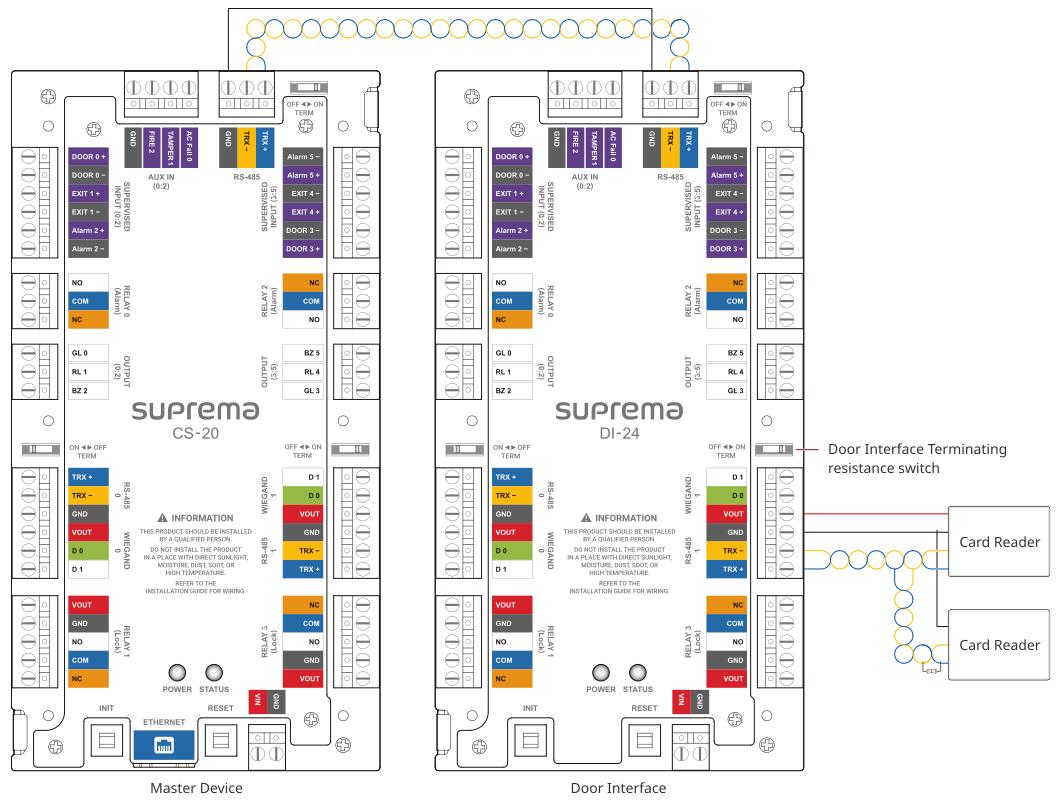
This product supports 3 RS-485 ports, and by daisy-chaining multiple Door Interfaces to the master device, you can configure up to 34 doors.
-
The maximum number of slave devices that can be connected to the product's RS-485 port is 4.
-
Up to 2 devices can be connected per port for RS-485 0 and RS-485 1.
-
If more than 3 devices are connected to a single RS-485 port, the desired device may not appear in the connectable list when searching for slave devices.
-
Use AWG26 or larger for RS-485 cables, and all wiring must comply with ANSI/NFPA 70 standards.
-
Use an AWG24 twisted pair with a maximum length of 1.2 km for the RS-485 cable.
-
It is recommended to use RS-485 cables with a characteristic impedance of 120 Ω.
-
Connect termination resistors (120 Ω) at both ends of the RS-485 daisy chain connection. If connected to the middle line, the signal level becomes smaller and the communication performance will deteriorate. Make sure to connect it to both ends of the daisy chain connection. Set this product's termination resistor switch to ON.
Relay Connection
The product has two types of relay ports—Alarm and Lock—each of which can be used for specific purposes.
-
Alarm: Can be connected to devices that generate warning sounds or intrusion alerts, such as warning lights, sirens, or buzzers.
-
Lock: Can be connected to devices for door locking and unlocking, such as electric strike locks or magnetic locks.
When using a magnetic lock, connect the lock power directly.
Fail Safe Lock
In order to use the Fail Safe Lock, connect the NC relay as shown in the figure below. There is normally a current flowing through the relay for the Fail Safe Lock. When the relay is activated, blocking the current flow, the door will open. If the power supply to the product is cut off due to a power failure or an external factor, the door will open.
Install a diode near both sides of the door lock wiring as shown in the figure to protect the relay from the reverse current that occurs when the door lock operates. Make sure to connect the Cathode (direction to the stripe) to the + part of the power while paying attention to the direction of the diode.
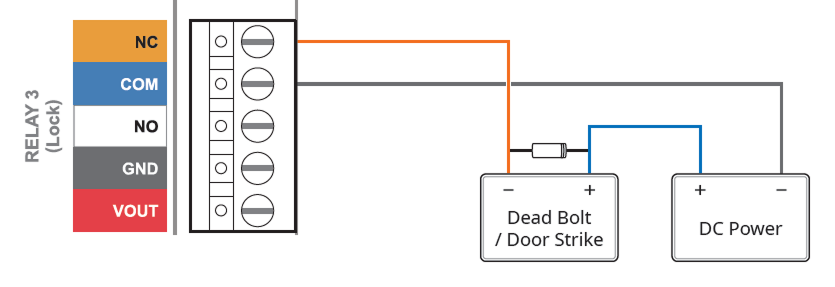
When using a magnetic lock, directly connect the lock power to the GND and VOUT of the Lock ports as shown in the figure below.
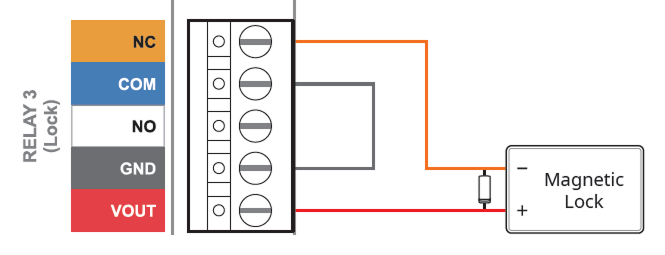
Only magnetic locks can be used when connecting the lock power directly.
Fail Secure Lock
In order to use the Fail Secure Lock, connect NO relay as shown in the figure below. There is normally no current flowing through the relay for the Fail Secure Lock. When the current flow is activated by the relay, the door will open. If the power supply to the product is cut off due to a power failure or an external factor, the door will lock.
Install a diode near both sides of the door lock wiring as shown in the figure to protect the relay from the reverse current that occurs when the door lock operates. Make sure to connect the Cathode (direction to the stripe) to the + part of the power while paying attention to the direction of the diode.
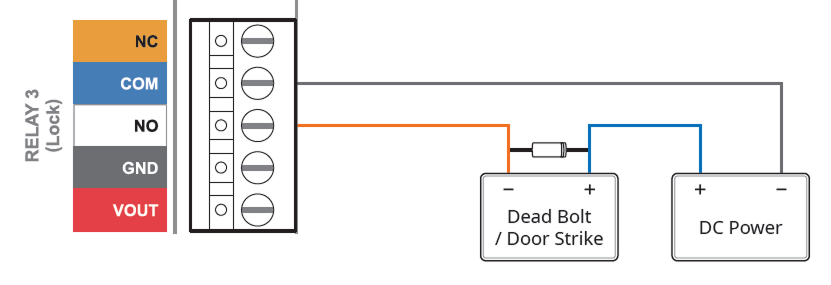
When using a magnetic lock, directly connect the lock power to the GND and VOUT of the Lock ports as shown in the figure below.
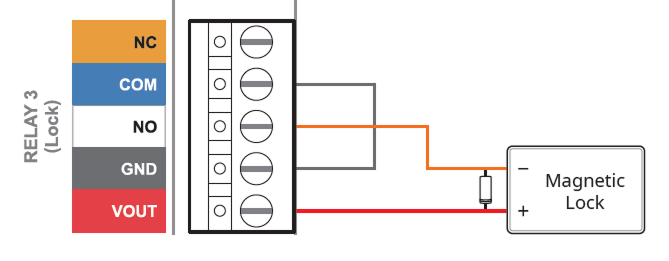
Only magnetic locks can be used when connecting the lock power directly.
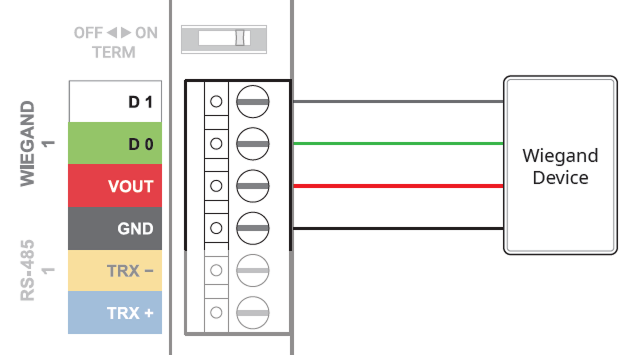
Wiegand Connection
Door sensor and exit button
SUPERVISED INPUT ports No. 0 - No. 5 can be set to be used for normal Input or Supervised Input.
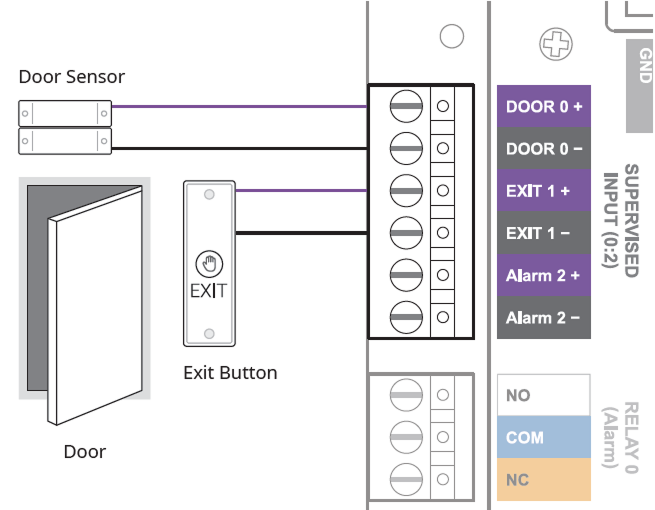
The SUPERVISED INPUT Alarm port can be used by connecting 1 kΩ, 2.2 kΩ, 4.7 kΩ, or 10 kΩ resistors. After connecting the appropriate resistor to the input device, set the resistor value the same in BioStar X.
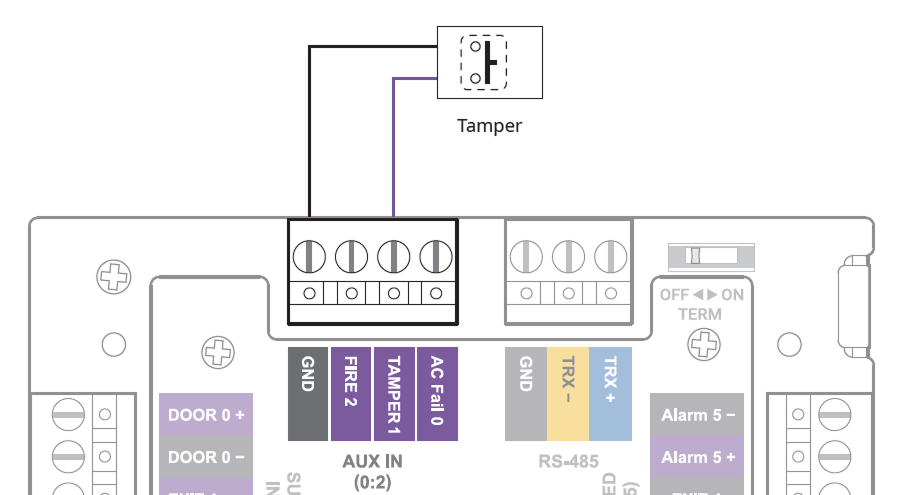
AUX IN
You can connect a power failure detector, tamper, or fire detector to the AUX IN port.