Maintenance and Care
This guide explains how to reset the camera to factory settings and replace the desiccant module.
Factory default
Deletes all information stored on the camera and resets all settings.
-
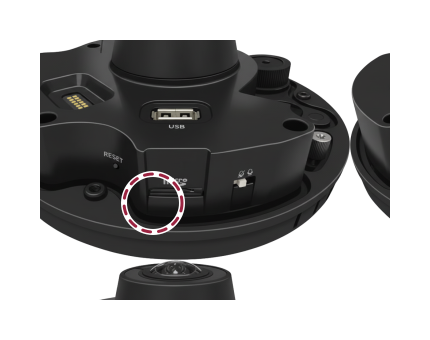
After connecting the camera to power, locate the reset button.
-
Press and hold the reset button for at least 5 seconds, then release it.
-
After the factory reset completes, the camera will restart automatically.
Performing a factory reset will delete all user data and settings, including network settings.
-
By default, the IP address is configured via DHCP.
-
If the camera does not obtain an IP address after a factory reset, it will revert to the default IP address (
https://192.168.1.100:8443). Use that address to connect.
Replacing the desiccant module
A desiccant module is installed inside the camera to prevent lens condensation. To maintain dehumidification performance, we recommend replacing the desiccant module at least every 1 year.
-
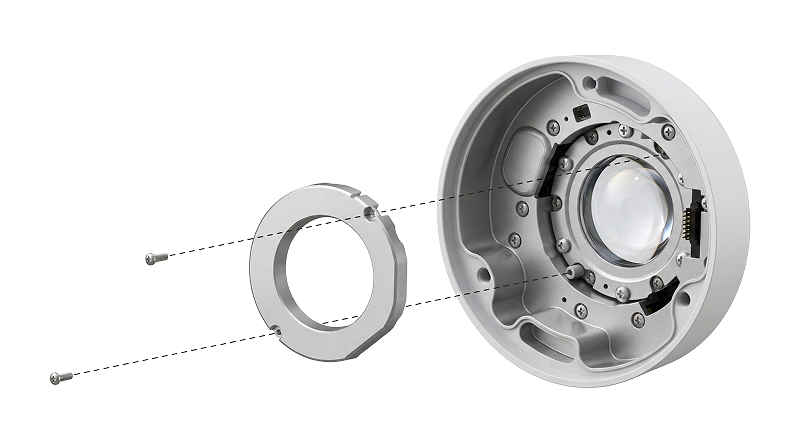
Check the mounting location of the desiccant module.
-
Loosen the screw by turning it counterclockwise, then remove the desiccant module from the cover.
-
Place the new desiccant module on the cover, then turn the screw clockwise to secure it.
Replacement intervals may vary depending on the installation environment.
-
Record the replacement date to keep track of the next replacement.
-
Replacement desiccant modules can be purchased from the retailer where you bought the product.