API Authentication
The BioStar Air Cloud API uses Bearer token (JWT)-based authentication. You must obtain a token through the login process before calling the API, and include it in the Authorization header of every request.
API Base URLs
| Environment | Base URL | Description |
|---|---|---|
| Demo (TEST) | https://sp-demo-api.airfob.com/v1 | When the application type is registered as a "Demo", you can download the demo environment site and site master account information as a csv file. |
| Production (LIVE) | https://sp-api.airfob.com/v1 | (Auto-Routing) Automatically selects the global or EU server based on the client region. |
| https://sp-a-api.airfob.com/v1 | (Global Dedicated) Connects to the global server environment. | |
| https://sp-e-api.airfob.com/v1 | (EU Dedicated) Connects to the EU(Europe) server environment. |
Auto-Routing environment may result in unexpected routing based on region detection.
API login flow
Make API calls with Postman or programmatically.
Log in
-
Endpoint:
login -
Payload:
{
  "username": "your_email",
  "password": "your_password"
}
Returns a Bearer token (JWT).
Get account information
-
Endpoint:
getSelfAccounts -
Authorization: Bearer Token
Returns a list of accessible sites and accounts.
Log in to an account
-
Endpoint:
loginAccount -
Authorization: Bearer Token
Returns a site-specific token.
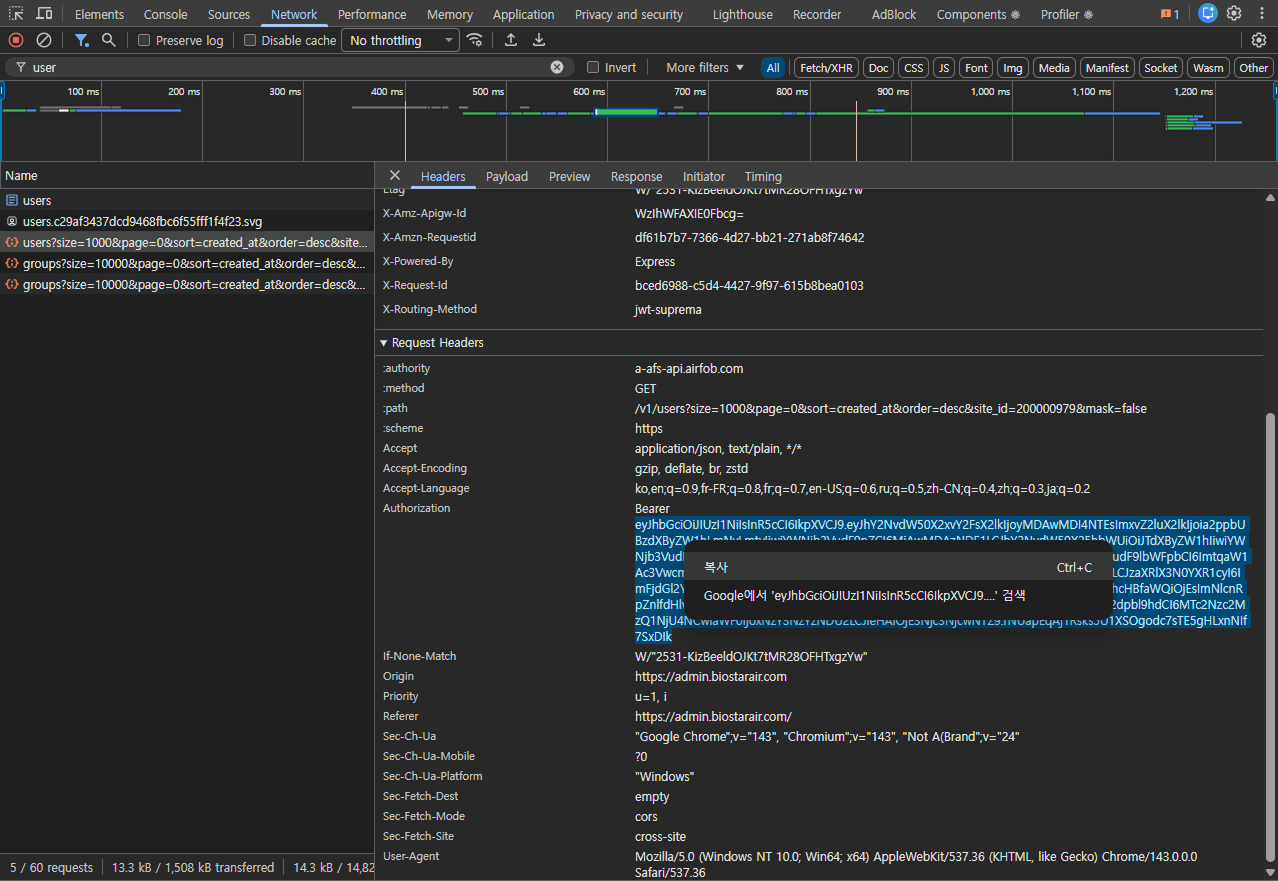
How to get a Bearer token from a web browser
You can obtain the Bearer token directly from your browser using the developer tools, without Postman.
Chrome/Edge (Windows or Mac)
-
In the web browser, press F12 or Ctrl/Cmd + Shift + I.
-
Go to the Network tab.
-
Refresh the page.
-
Search for API calls.
e.g.,
groups,login -
Click the request in the list.
-
Go to the Headers tab.
-
In the request headers, find
Authorization: Bearer .... -
Right-click the token and copy it.
Safari (Mac)
-
Enable the Developer menu. In Safari, go to Preferences → Advanced and check Show Develop menu.
-
Go to Develop → Show Web Inspector.
-
Go to the Network tab.
-
Refresh the page.
-
Filter and inspect API calls.
-
Copy the
Authorization: Bearertoken from the request headers.
A Bearer token copied from the browser can be reused in Postman. Always use the latest Bearer token.