Register Device
Use the BioStar Air mobile app to register devices. Devices are enrolled via BLE, and registered devices can be managed on the BioStar Air platform.
-
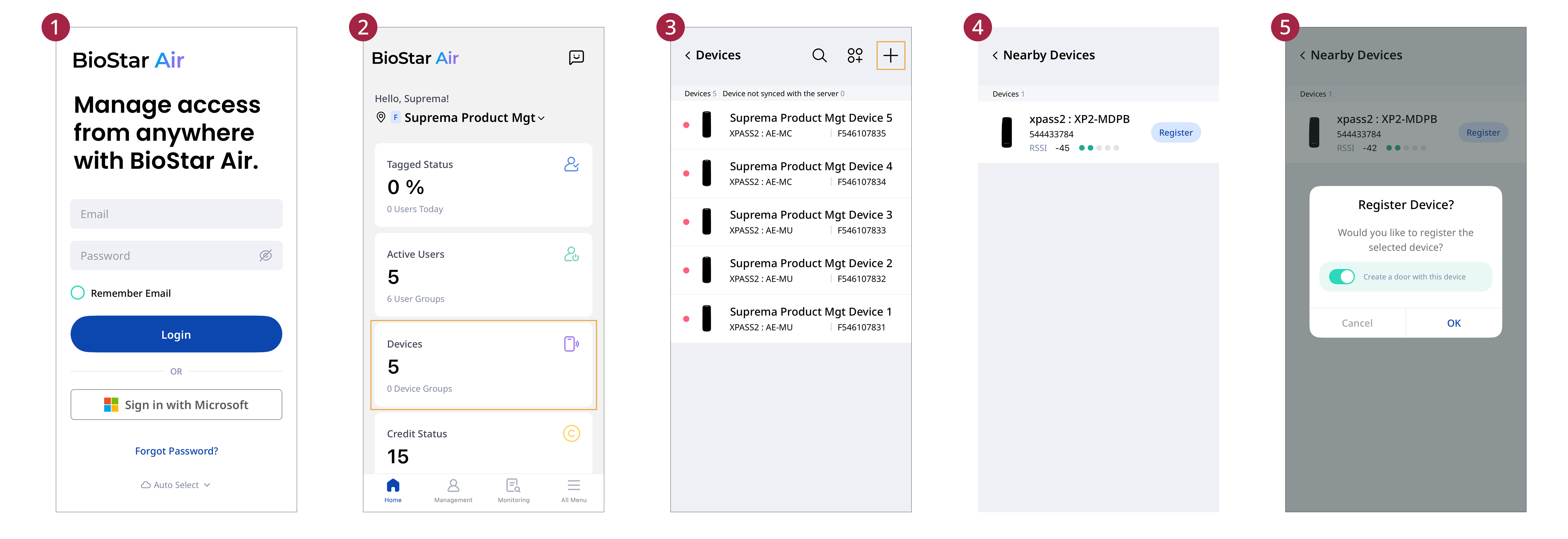
Open the BioStar Air app on your mobile device and log in.
-
Tap the Devices card.
-
Tap at the top right of the screen.
-
In the device search screen, tap Register for the device to register.
-
When the device registration window appears, tap OK.
Return to the device list and confirm the added device.
-
Devices cannot be registered on the web portal. Register the device via the BioStar Air mobile app.
-
When registering a device, keep the device close to the mobile device and ensure that Bluetooth is enabled on the mobile device.
-
Disable the Create a door with this device option in the device registration window to avoid setting the registered device as a door.