Security Settings
Configure security policies properly to prevent unauthorized access and keep the site secure. You can strengthen site security by locking inactive administrator accounts, enabling email-based 2-factor authentication, and setting password change intervals.
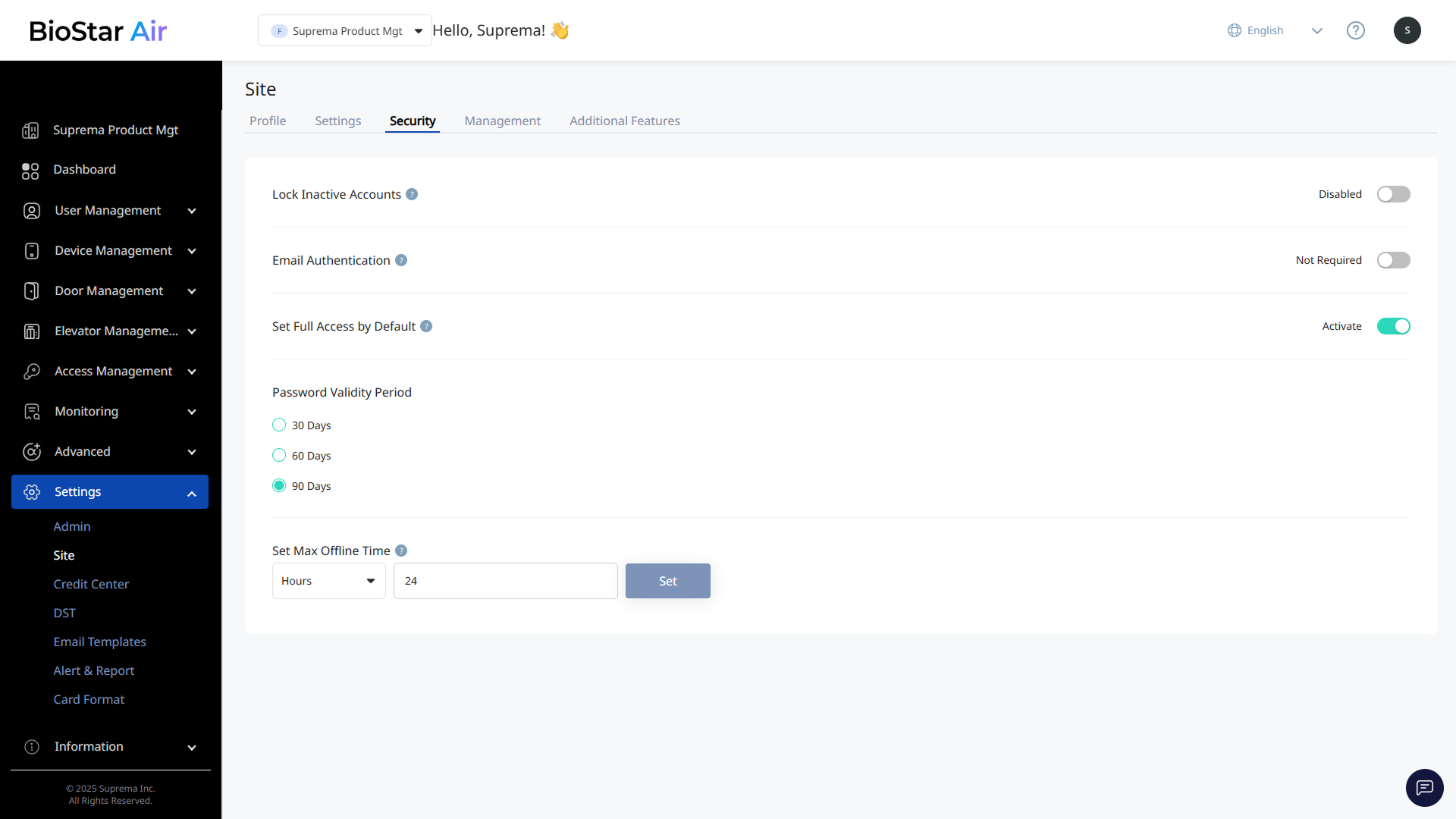
Click Settings → Site in the left sidebar. Use the Security tab to configure site security settings.
-
Lock Inactive Accounts: Lock administrator accounts that have been inactive for more than 90 days.
-
Email Authentication: Require email two-factor authentication each time an administrator signs in.
-
Set Full Access by Default: Grant 'full access' to new users by default when no other access rights are selected. If this setting is disabled, assign access levels manually. Temporary users are not granted full access automatically even if the setting above is enabled.
For more information about access levels, see Manage Access Levels.
-
Password Validity Period: Require password reset every 30, 60, or 90 days.
-
Set Max Offline Time: Set how long mobile credentials remain valid when the device is offline.
-
The default is 5 minutes and can be set from 1 minute to 8 days.
-
This helps balance security and convenience, especially at remote sites with limited network connectivity.
-