Registrar Credenciales Wiegand
Esta guía describe cómo agregar un dispositivo Wiegand al dispositivo maestro o esclavo registrado.
-
Dispositivo maestro: Entre los dispositivos conectados mediante RS-485, el dispositivo que cumple la función de controlador. Procesa datos supervisando periódicamente al dispositivo esclavo. También se denomina dispositivo host.
-
Dispositivo esclavo: Entre los dispositivos conectados mediante RS-485, el dispositivo que solo realiza funciones de entrada y salida. No contiene información de usuarios y es controlado por el dispositivo maestro.
-
Wiegand: Método que transfiere una pequeña cantidad de datos usando D0 y D1. Generalmente se utiliza como método de comunicación entre el lector y el controlador de un dispositivo de control de acceso.
-
Haz clic en Ajustes en la página Lanzador.
-
Haga clic en Dispositivo en la barra lateral izquierda.
-
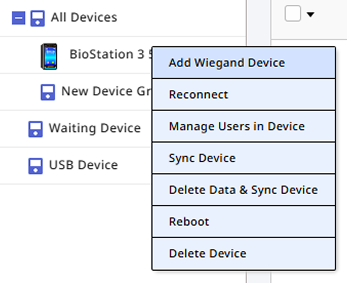
Haz clic con el botón derecho en el dispositivo maestro o esclavo en la lista Todos Dispositivos.
-
Haz clic en Añadir Dispositivo Wiegand en el menú emergente.
-
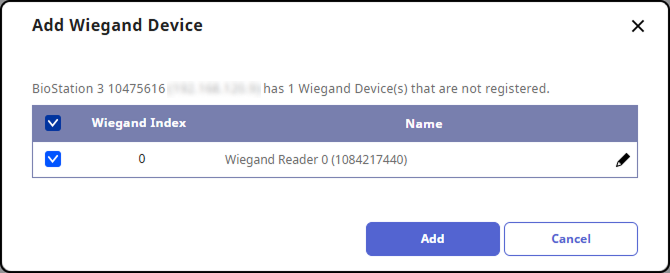
Cuando aparezca la lista de dispositivos Wiegand conectados al dispositivo maestro, selecciona el dispositivo que deseas registrar.
-
Haz clic en Añadir.
-
Cuando aparezca el mensaje de confirmación del registro del dispositivo, haz clic en Aplicar.
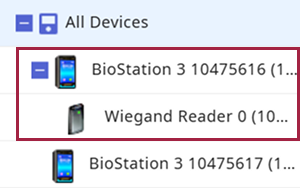
El dispositivo Wiegand registrado aparecerá debajo del dispositivo seleccionado.